Building a DIY Motion-Controlled Light Gun with Arduino and MPU6050

In early July of 2025 and after building my ESP32-S3 gameboy, I decided to take on a project that sat right at the intersection of nostalgia, hardware hacking, and software experimentation, I decided to try building a motion-controlled light gun from scratch.
Not a USB toy, not a commercial controller — but a fully custom-built gun that translates real-world motion into mouse movement, designed to work with PC games. Every part of it, from the electronics to the calibration logic, was built and tuned by hand.

The Idea
Classic light guns relied on CRT displays, which made them almost useless in the modern LCD era. Instead of trying to replicate old-school optical detection, I wanted something different:
- A gun that tracks motion
- Feels physical (real trigger, real kick)
- Behaves like a mouse, so it works with any PC game
- Starts centered on screen and stays controllable
Most of the modern light guns that are built nowadays have an IR positioning camera built inside. Since this camera was not available to me. I had to develop another method to detect motion of the gun and map it to mouse movments. That’s where IMU-based tracking came in.
Hardware Overview
The core of the build revolves around a few key components:
- Arduino Pro Micro – compact, reliable, and easy to embed
- MPU6050 – 6-axis IMU (accelerometer + gyroscope)
- Solenoid – for recoil feedback on trigger pull
- MOSFET + flyback diode – to safely drive the solenoid
- Custom trigger switch
- 3D-printed enclosure, PS1CON Scanned STL file printed
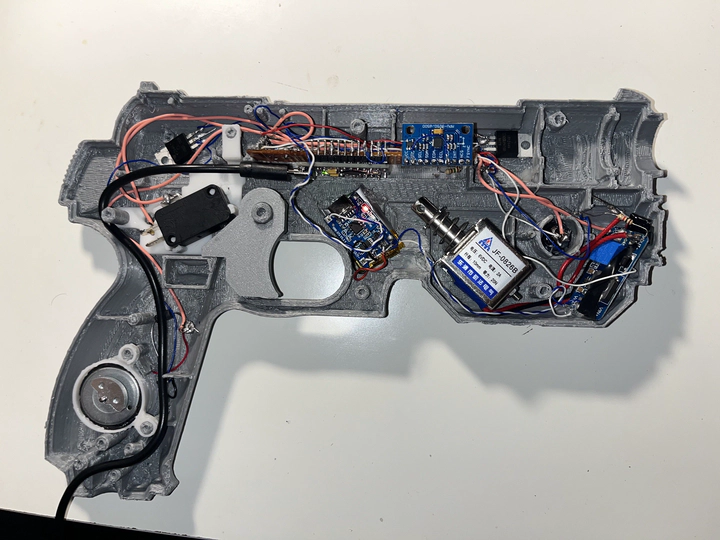
All electronics were mounted inside the shell with zero PCBs — everything is point-to-point wired and secured manually.
The solenoid was a must. I didn’t want this to feel like clicking a mouse — I wanted mechanical feedback. When the trigger is pulled, the solenoid snaps back instantly, giving a sharp recoil that makes the whole thing feel alive.
Motion Tracking with MPU6050
The MPU6050 handles all orientation and movement sensing. Rather than relying on absolute position (which IMUs are terrible at), the system tracks angular velocity and integrates it into smooth cursor movement.
Key challenges here:
- Gyro drift
- Noise from small hand movements
- Sensitivity tuning so aiming feels natural
To deal with this, I implemented:
- Gyroscope bias calibration at startup
- Dead zones for micro-movements
- Adjustable sensitivity scaling
The result is motion that feels responsive without being jittery.
Turning Motion into a Mouse
On the Arduino side, the gun streams processed motion data over serial. On the PC side, I wrote a custom calibration and mapping program that:
- Starts the cursor locked to the center of the screen
- Converts angular motion into relative mouse movement
- Applies smoothing and gain curves
- Allows recalibration without restarting
This software layer was critical. Raw IMU data alone doesn’t feel good — the calibration logic is what makes the gun usable.
Once dialed in, the gun behaves just like a mouse — which means it works with:
- FPS games
- Emulators
- Target-shooting games
- Any application that accepts mouse input
Internal Layout
Here’s a look inside the gun before closing it up:


It’s messy in the way all real prototypes are — wires routed by necessity, hot glue where screws wouldn’t fit, and components packed tighter than planned. But everything i